Deactivate from Workflow Node
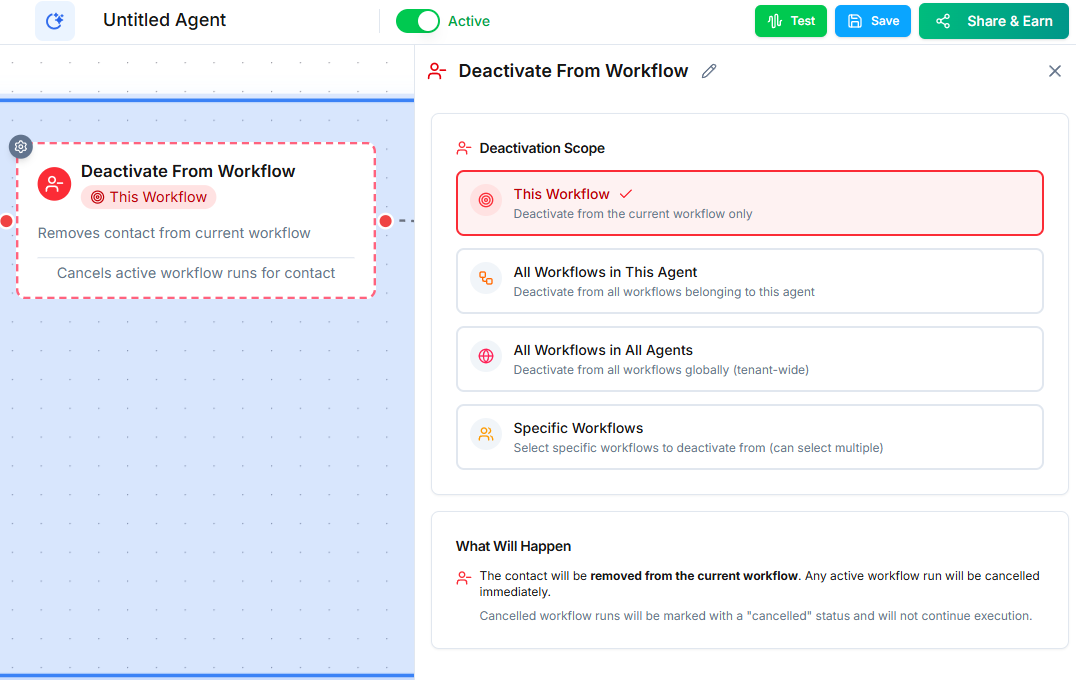
The Deactivate from Workflow node removes a contact from an active workflow. Use it to stop ongoing sequences when a contact has already responded, converted, or should no longer receive outreach.
Video Walkthrough
How It Works
When the workflow reaches this node, it pulls the specified contact out of the target workflow. Any pending actions in that workflow --- scheduled calls, waiting timers, queued messages --- are canceled for that contact.
Why Deactivation Matters
Without deactivation, contacts can receive duplicate or irrelevant outreach. Consider this scenario:
- A drip campaign is set to call a contact on Day 1, Day 3, and Day 7.
- The contact answers on Day 1 and books an appointment.
- Without deactivation, they still receive the Day 3 and Day 7 calls.
The Deactivate node prevents this by removing the contact from the drip workflow as soon as they convert.
Common Use Cases
- Contact responded --- Remove from the outreach workflow when the contact replies to an SMS or answers a call.
- Appointment booked --- Stop follow-up sequences after a successful booking.
- Opted out --- Immediately remove contacts who ask to stop receiving communication.
- Deal closed --- End nurture sequences when a deal is won or lost.
Tips
- Place this node in the workflow that detects the conversion event, not in the outreach workflow itself.
- You can deactivate a contact from any workflow, not just the current one.
- Combine with the Set Pipeline node to both stop outreach and update the contact's status in one flow.
Next Steps
- Building Outbound Campaigns --- design campaigns with proper deactivation logic