Do Not Disturb / Opt-Out Node
The Do Not Disturb (DND) / Opt-Out node sets communication preferences on a contact's record. Use it to programmatically opt contacts out of specific channels or all communication when they request it.
Video Walkthrough
How It Works
When the workflow reaches this node, it updates the contact's DND flags based on your configuration. Once a DND flag is set, will not send outbound communication to that contact on the flagged channels.
Configuration
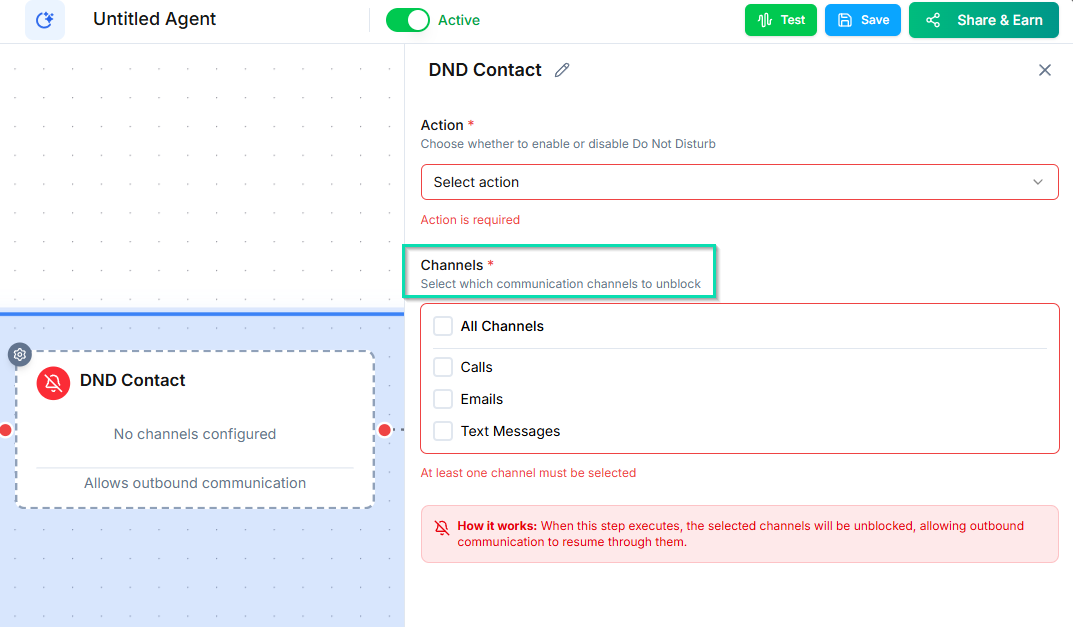
You can set DND on individual channels or all channels at once:
- Phone calls --- block outbound calls to this contact.
- SMS --- block outbound text messages.
- Email --- block outbound emails.
- All channels --- block all outbound communication.
Common Use Cases
- Caller requests opt-out --- During a conversation, if a contact says "stop calling me," the workflow can immediately set the DND flag.
- Unsubscribe handling --- When a contact replies "STOP" to an SMS, trigger a workflow that sets the SMS DND flag.
- Channel preference --- If a contact says they prefer email only, set DND on phone and SMS while leaving email active.
- Regulatory compliance --- Ensure that opt-out requests are honored immediately and automatically.
Why Automate DND
Manual opt-out management is error-prone and slow. By including the DND node in your workflows, you ensure that:
- Opt-out requests are processed instantly, not hours or days later.
- No team member needs to remember to update the record.
- Compliance is maintained consistently across all contacts.
Tips
- Place this node immediately after detecting an opt-out intent --- do not add unnecessary steps between the request and the action.
- Combine with an Add Note node to log why the DND was set (e.g., "Contact requested no further calls on 2024-03-15").
- The DND flag can be manually removed from the contact's profile if the contact later opts back in.
Next Steps
- Contact Sidebar DND --- view and manage DND settings from the contact sidebar